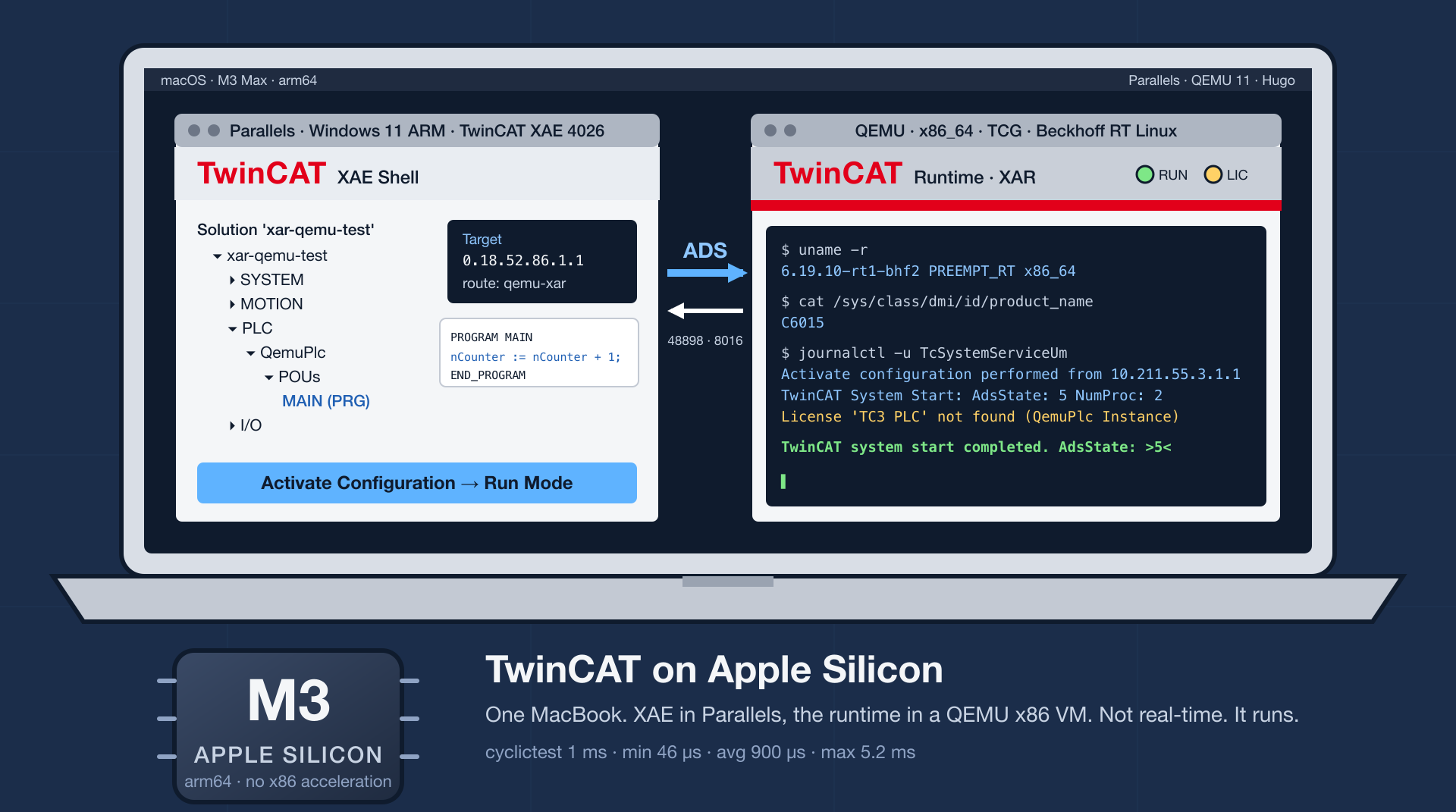
I develop for Beckhoff TwinCAT on a MacBook. The engineering tool, XAE, runs fine in a Windows VM under Parallels. The runtime, the part that executes the PLC program, was another matter. Over the past month I had convinced myself, with some care, that it could not run on this machine at all, and I had written that conclusion into the README of the repository where I keep my TwinCAT container work. This evening the runtime was running on the Mac, XAE was talking to it, and a PLC program had gone to RUN. This is an account of how the earlier conclusion came about and why it was wrong.
There were three pieces of evidence. The first was Docker. Beckhoff publishes an amd64 build of the Linux runtime, and on an ARM Mac Docker Desktop runs amd64 containers through Rosetta. The runtime starts, gets as far as its hardware abstraction layer, fails there, and never brings up an ADS server. I had watched that happen and taken it as the end of the story.
The second was Beckhoff themselves. Their documentation has a table of installation systems, and the row for Windows on Arm says, under real-time runtime, “Not possible.” When I asked support about it they gave a reason that sounded final: ARM cannot emulate the x86 memory model that the ADS router depends on, so the router will not work under emulation.
The third was the runtime’s own log. Under Rosetta it prints “Unknown Intel CPU model: 0x2C” and then fails, and I read the first as the cause of the second.
None of this was careless. But I did not quite believe it either. I have spent enough years around virtualization, emulators, and faked hardware to find it implausible that nobody could put a PC in front of this thing, and I could not say precisely what the runtime was checking, only what I had inferred it was checking. So I decided to find out.
The binaries are stripped, but they are not obfuscated, and a few hours with objdump answered most of the questions. The “Unknown Intel CPU model” message comes from a function that takes the CPU family and model bytes from the cpuid instruction and looks them up in a switch statement to produce a name: Sandy Bridge, Skylake, Meteor Lake, Zen 1 through 5, and so on. Model 0x2C, which is what Rosetta reports, is not in the table, so the default case prints the message. Then the function returns and the caller goes on. It is a name lookup, not a check. I had been reading a diagnostic as a verdict.
The actual failure in Docker is a few lines further down. The hardware layer opens /dev/mem for writing and maps physical address ranges, the way it would on a Beckhoff IPC to reach the PCI space. Docker Desktop runs its containers inside a small Linux VM built from LinuxKit, and that VM’s kernel is configured with STRICT_DEVMEM, has no SMBIOS tables, and has no PCI address space worth mapping. The mapping fails with “Operation not permitted” and the runtime gives up. So the Docker test had measured Docker’s kernel, not the Mac.
The support answer was similarly true and similarly narrow. QEMU’s user-mode emulation, and the x64 emulation layer in Windows on ARM, translate instructions but do not preserve x86’s total store ordering, and a program written against that ordering will misbehave under them. Rosetta does preserve it; Apple built that into the hardware. So does a full-system emulator, at least the way QEMU runs one on an ARM host: for a strongly ordered guest it executes the guest’s processors one at a time in a single thread, so the ordering holds by construction. Support had answered the question they were asked, which was about running the Windows runtime under Windows on ARM.
What was left, once the three answers had been put back in their boxes, was a runtime that does not want Beckhoff hardware in particular. It wants a PC. It wants firmware tables, a PCI bus, and a kernel that will let it map physical memory, because every machine it has ever run on had those and there was never a reason to ask for less. A container on somebody else’s kernel is not a PC. A full-system virtual machine is one. Nobody had tried a full-system VM on an ARM Mac because there is no hardware acceleration for x86 guests there, which means QEMU’s TCG binary translator, and everyone, including me, assumed that was too slow to bother with.
So I tried it. QEMU installs from Homebrew. The Beckhoff RT Linux installer is a UEFI stick image, with a GPT, systemd-boot, a unified kernel image containing a PREEMPT_RT 6.19 kernel, and a small partition that holds a first-boot script; it boots under OVMF like any other stick. The QEMU invocation, trimmed:
qemu-system-x86_64 -machine q35 -accel tcg,thread=single -cpu Skylake-Client-v4 \
  -device intel-iommu -smbios type=1,manufacturer=Beckhoff,product=C6015 \
  -drive if=pflash,format=raw,readonly=on,file=edk2-x86_64-code.fd ...
The IOMMU device is there because the runtime’s configuration tool expects /sys/kernel/iommu_groups to exist. The SMBIOS string is there because it was cheap. The installer asked for a target disk and an administrator password and finished in about five minutes. The first boot took a minute. Inside the guest I had a Skylake, according to cpuid, a DMI product name of C6015, IOMMU groups, and a /dev/mem that could be mapped. Beckhoff RT Linux comes with the Beckhoff package repository already configured, so installing the runtime was a matter of adding my credentials and running apt install tc31-xar-um. When the service started, the journal said:
TcSystemServiceUm: RTE driver not found. Please ensure that the package libtcrte is installed.
TcSystemServiceUm: BBAPI device '/dev/bbapi' not present on Beckhoff hardware.
TcSystemServiceUm: license validation status is Valid(3)
TcSystemServiceUm: TwinCAT system start completed. AdsState: >15<
AdsState 15 is CONFIG mode. The runtime in Docker, on the same Mac, never prints that line. That was the result I had been told was impossible, and it took an evening.
What followed took longer than the result did, and most of it was my own tooling getting in the way. I had been using the open-source adstool as a health check, and it reported error 6, “target port not found”, on every port of the new runtime, exactly as it had in Docker. Since error 6 had been my evidence that the Docker runtime never registered an ADS server, this was disconcerting. It turned out that the Windows TwinCAT router and Beckhoff’s .NET client could talk to the runtime without any trouble; adstool simply cannot, for reasons I have not chased down. Error 6 from adstool means that adstool is unhappy. It does not mean the runtime is dead, and my earlier reading of it had been a fourth inference that did not hold.
The next obstacle was the guest’s firewall. Beckhoff RT Linux ships nftables with a default drop policy, and it opens SSH, HTTPS, Secure ADS on port 8016, and the UDP discovery port. Plain ADS on 48898 is not open. This was hard to see from outside because QEMU’s user-mode network completes the TCP handshake on the host before forwarding anything, so a port scan from the Mac said the port was open while QEMU’s own connection table showed the SYN sitting unanswered at the guest. A one-rule drop-in in /etc/nftables.conf.d fixed it; a Secure ADS route would have done as well.
Then there were routes to set up on both ends. The guest reads them from /etc/TwinCAT/3.1/Target/StaticRoutes.xml. On Windows, TwinCAT 4026 no longer keeps the router’s configuration in the registry; the router derives its NetId from the machine’s IP address and reads a static routes file under ProgramData, which on my machine did not exist until I wrote it. After a router restart the .NET client, running in the Parallels VM, read the runtime’s state through the Mac: port 10000, the system service, was in CONFIG; so were port 200, the real-time core, and port 300, the I/O server.
A runtime in CONFIG mode has nothing to do. To give it something I opened XAE, picked the new route as the target system, added a PLC project from the Standard PLC Template, put a counter in MAIN, and clicked Activate Configuration, then Restart TwinCAT in Run Mode. XAE compiled, downloaded, and restarted the target without complaint. The guest’s journal:
Activate configuration performed from 'XAE-WIN11' (10.211.55.3.1.1) by 'patdhlk'
TwinCAT System Start: AdsState: 5 NumProc: 2
License Violation: License 'TC3 PLC' not found, Requested by 'QemuPlc Instance'
TwinCAT system start completed. AdsState: >5<
Error: >> license not found << checking TwinCAT Licenses!
TwinCAT System Start: AdsState: 15
AdsState 5 is RUN. XAE had chosen the Linux toolchain on its own, compiled the project for the platform it calls “TwinCAT OS (x64-E)”, and delivered a 50 KB boot file to the guest. The runtime loaded the program and started it. About three hundred milliseconds later it stopped again, because a fresh installation has no PLC licence, and the seven-day trial licence is issued through a captcha in XAE. That is the one step in the whole exercise that requires a person, and it has nothing to do with engineering.
I should be clear about what this is not. It is not real-time. I ran cyclictest in the guest at a 1 ms interval with real-time priority and an otherwise idle host, and got a minimum of 46 µs, an average of 900 µs, and a maximum of 5246 µs:
| Min | Avg | Max |
|---|---|---|
| 46 µs | 900 µs | 5246 µs |
On average a 1 ms task loses most of its cycle to wake-up latency, and in the worst case it loses five cycles. Such a task will overrun continuously. A 10 ms task is fine for logic and for unit tests with TcUnit. QEMU will not run multi-threaded TCG for a strongly ordered guest on a weakly ordered host unless you force it, and forcing it gives away exactly the memory ordering the ADS router needs, so this is about as fast as it will go. It is also the user-mode runtime, which offers no timing guarantees and no EtherCAT even on Beckhoff hardware, and Beckhoff supports none of what I have described. What it is good for is developing and testing PLC logic on a laptop with no network and no hardware, which is what I wanted.
The lesson I take from it is an old one. Each of my three answers had come from testing one layer and then generalizing past it, and the generalization was where the error lived. Docker looked like Linux, but it was not a PC. The log line looked like a refusal, but it was a lookup. The support answer was about a different emulator. None of it was corrected by cleverness, by patching a kernel or faking a device, which is what I had expected to need. It was corrected by declining to accept an inference, reading the code that actually makes the decision, and then giving that code what it asked for.
I should also say that most of the hands-on work was done by an AI agent working from my prompts. It read the installer’s partition table, booted QEMU without a display and drove the installer by taking screenshots and sending keystrokes through the monitor socket, decoded the CPU model switch out of the stripped binaries, found the firewall rule by reading the nftables ruleset, drove XAE through its Automation Interface from PowerShell inside the Windows VM instead of clicking, and wrote the runbook. From installing QEMU to the PLC going to RUN took under an hour. A month earlier the same question, asked of the same tools by me, had produced three careful and well-documented noes.
The research note, the runbook, and the scripts are in patdhlk/beckhoff-rt-linux under docs/research/. On a new Mac it takes about fifteen minutes to get to a PLC in RUN, plus the installer download and one captcha.

OpenTelemetry Won't Tell You Why the Robot Stopped
Local AI, With the Meter Running